Live video translation for Chrome

Hear videos in your language. Live.

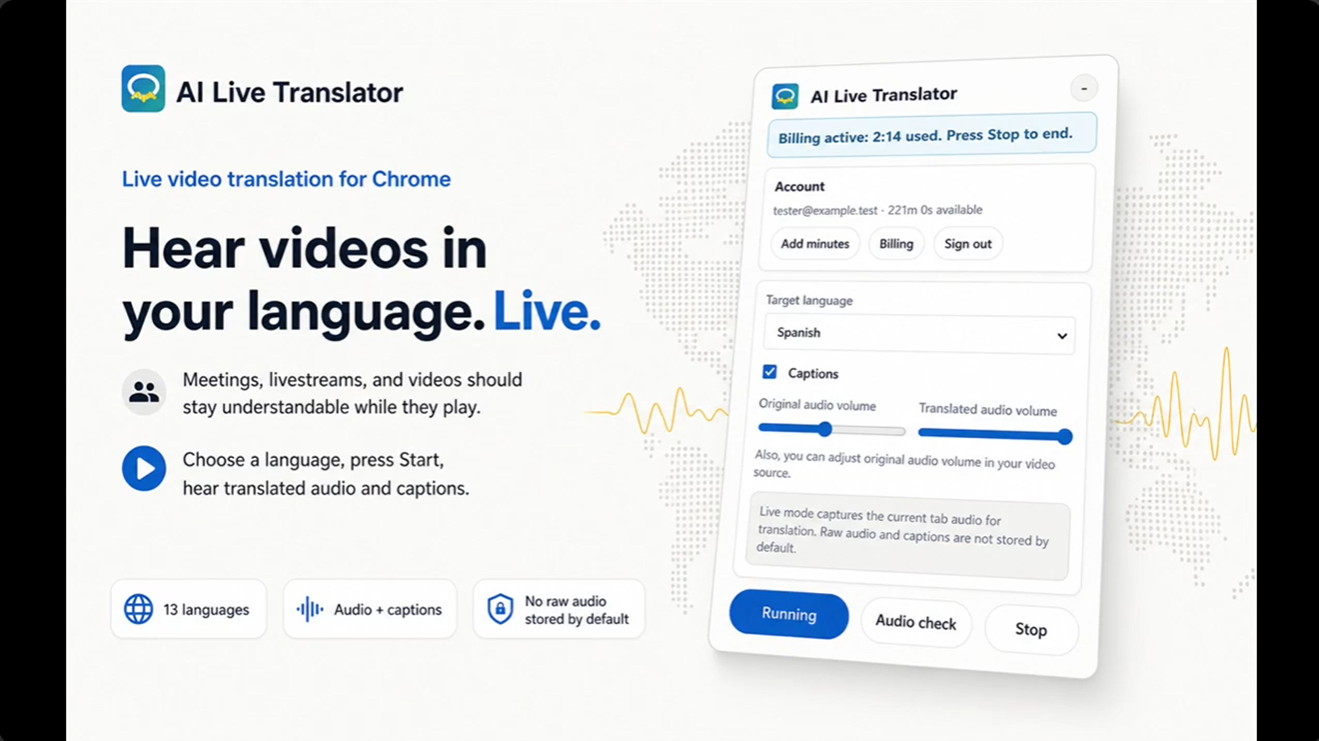
AI Live Translator turns your video’s audio into translated speech and live captions while it keeps playing.
  • 13 languages
  • Translated audio + captions
  • Raw audio is not stored by default
AI Live Translator extension showing language, captions, volume, minutes, Start, and Stop controls

Watch demo

Watch live translation happen.

See the real extension controls you use to choose a language, start translation, follow captions, and stop.

Demo video available now Open the complete text walkthrough
First frame of the AI Live Translator product demo video
Open on YouTube
Real product walkthrough hosted on YouTube. The extension is shown with safe test data.

The language gap is still in the player

The right video should not become unusable because you cannot follow the audio.

Courses, meetings, webinars, and live broadcasts move too quickly for manual translation. AI Live Translator keeps the source playing and gives you translated speech plus captions in the language you choose.

Learners

Follow courses and webinars when the speaker uses another language.

Best fit
Online courses and webinars in Chrome

Professionals

Understand the conversation you hear during browser-based meetings.

Best fit
Google Meet and Zoom Web in Chrome

Global viewers

Listen to videos and live content with translated audio and captions.

Best fit
YouTube, livestreams, and other Chrome tabs with playable audio

A clear five-step workflow

From browser audio to understanding, without leaving the tab.

The selected tab keeps playing while translated speech and live captions appear. Start and Stop remain explicit.

  1. Open a sourceChoose a Chrome tab with playable audio.
  2. Choose a targetSelect one of 13 supported output languages.
  3. Press StartBegin user-controlled capture of the selected tab audio.
  4. Listen and readHear translated speech and follow live captions while the source continues.
  5. Press StopEnd capture and minute billing together.
Open the complete walkthrough
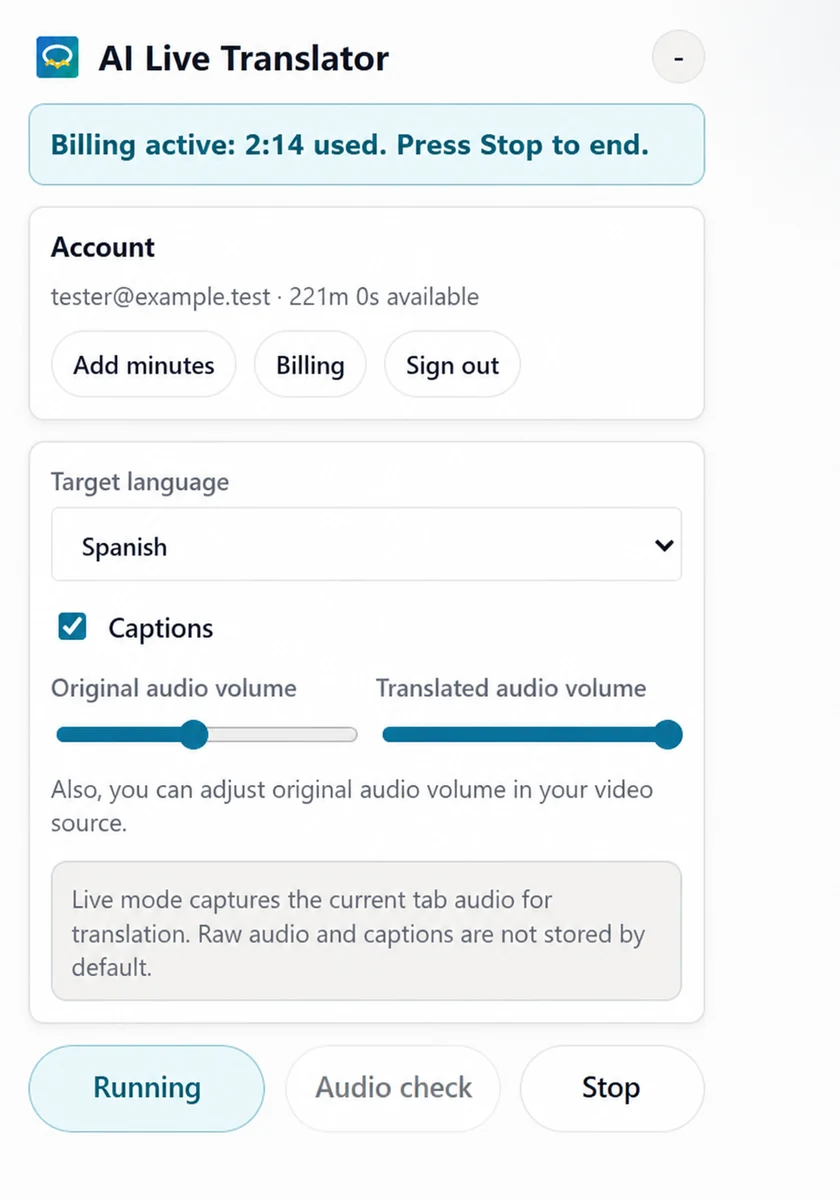
AI Live Translator Chrome extension showing account minutes, target language, captions, volume controls, and Start and Stop actions
Actual extension interface shown with sanitized test data.

Languages and privacy

Broad enough to be useful. Narrow enough to stay understandable.

English Spanish Russian Portuguese French Japanese Chinese German Korean Hindi Indonesian Vietnamese Italian

Supported sources

Chrome tabs with playable audio

  • YouTube
  • Online courses
  • Webinars
  • Livestreams
  • Google Meet in Chrome
  • Zoom Web in Chrome

Privacy boundaries

Capture starts only after your action

  • You choose the tab and start translation manually.
  • Raw audio is not stored by default.
  • Browser history, screenshots, meeting URLs, and video URLs are not collected for translation.

Current boundaries

  • Chrome browser tabs with playable audio only.
  • Listen-only: no outgoing microphone translation or meeting audio injection.
  • Some delay is expected and varies with network, audio quality, browser load, and language pair.
  • Important legal, medical, financial, or safety-critical information needs human verification.

Simple minute pricing

Start free. Add only the time you need.

10 free minutes are added after account linking. Monthly plans start at $15/month, and active subscribers can add 50 extra minutes when needed.

$15Starter · 120 min$29Pro · 300 min$59Power · 750 min
Compare plans

Straight answers

What people need to know before they start.

What sources does it work with?

It works with browser tabs that play audio, including YouTube, online courses, webinars, livestreams, Google Meet in Chrome, and Zoom Web in Chrome. Native desktop apps are not supported in the current version.

How much delay should I expect?

Some delay is expected because audio must be captured, sent to the translation provider, translated, and played back. Delay can vary by network, source audio quality, language pair, and browser load.

Does it translate my microphone or outgoing voice?

No. The current version is listen-only. It does not translate your outgoing microphone speech and does not inject translated audio into a meeting.

Which languages are supported?

The current target list is English, Spanish, Russian, Portuguese, French, Japanese, Chinese, German, Korean, Hindi, Indonesian, Vietnamese, and Italian.

Do you store my audio?

Raw audio is not stored by default. Audio from the selected browser tab is sent to the translation provider to generate translated audio and captions.

Ready when the video starts

Hear your next browser video in your language.